
New in go53
Backup & Restore that just works — full snapshots plus a live WAL
Losing a DNS zone shouldn't mean losing your weekend. go53 now ships with built-in full backups and a compact Write-Ahead Log (WAL) — so you can roll your authoritative server back to any point in time with two commands. No external database tooling, no fragile scripts. Local-first, operator-friendly, and fast.
?️ One-command snapshots
A single tar stream with zones, runtime config, TSIG keys and DNSSEC material.
⏱️ Point-in-time recovery
Replay logical WAL events on top of a base backup to reach any moment you choose.
? Continuous archiving
wal-follow streams new segments to a directory, hands-free.
How it fits together
A full backup records the WAL sequence visible at the start and end of the snapshot. From there, every mutating API call appends a compact binary event to the WAL. Recovery is simply restore the base, then replay the WAL — in order, until you hit your target.
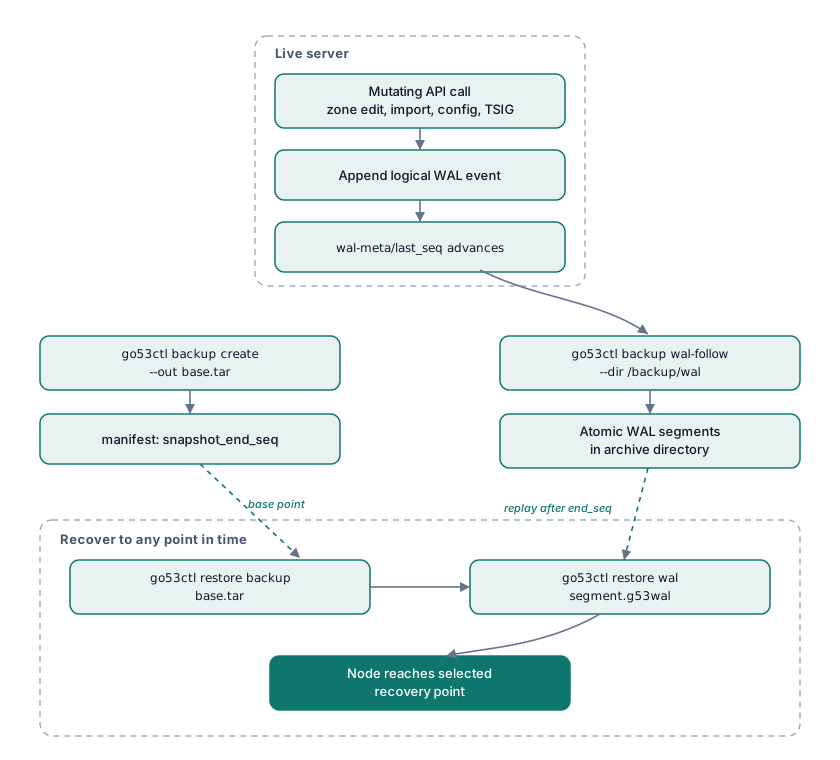
Turn on continuous WAL archiving
Point the follower at a directory and let it run under your service manager. It tracks its own
progress in .go53-wal-follow.seq and writes each segment atomically — so an archive file
is never half-written.
# Continuously archive new WAL segments into a directory
go53ctl backup wal-follow --dir /backup/go53/wal --interval-sec 60
Take a base backup
# Write a full tar backup go53ctl backup create --out /backup/go53/base.tarInspect the WAL boundary the snapshot recorded
tar -xOf /backup/go53/base.tar manifest.json # -> snapshot_end_seq
Restore: base first, then WAL
Restore the base backup, then replay each WAL file whose first sequence is greater than the
backup's snapshot_end_seq, in order, until you reach the point you want.
# 1) Restore the full backup into the running local instance
go53ctl restore backup /backup/go53/base.tar

# 2) Replay archived WAL segments in sequence order
go53ctl restore wal /backup/go53/wal/go53-wal-00000000000000000124-00000000000000000180.g53walWhy operators love it
- Local-first & secure: everything runs over the same Unix admin socket as
go53ctl— never exposed on the TCP admin API. - Storage-agnostic by design: the WAL is a logical go53 log, not database pages, so recovery replays go53 operations and survives future storage-backend changes.
- Tamper-evident: exported files carry the
GO53WAL1magic header, length-prefixed records and per-record checksums — truncated or corrupted exports fail loudly on decode. - Predictable retention:
wal_retention_days(default14,0= keep forever) controls the internal WAL; your external archives stay under your control.
Full backups, continuous WAL, point-in-time restore — three commands, zero drama. Read the full backup documentation → (Available at release or @feature/backup branch)